Short answer Decide which audio is broken — the film, your microphone, or their voice — then fix that one.
"Audio not working" is three different tickets wearing the same coat. The film's own sound has nothing to do with the extension; your microphone is a permissions question; their voice not reaching you is a connection question. Sorting them apart takes one question, and it saves you trying fixes for the wrong problem.
Which audio is broken?
| Symptom | This is | Go to |
|---|---|---|
| The film has no sound, and the party is irrelevant | A player or system volume problem | Section 02 |
| They cannot hear you | Microphone permission, device or state | Section 03 |
| You cannot hear them | Their microphone, or the voice connection | Section 04 |
| Voice cut out after a while | Almost certainly the weekly free voice allowance | Section 05 |
Worth saying once: a watch party never touches the film's audio. The extension does not route, mix or re-encode what you are watching — each side plays its own stream through its own player at its own volume.
The film itself is silent
Then this is not a party problem, and the party is a red herring. Work down the chain:
- The player's own mute button. On YouTube, m toggles it, and it is easy to hit accidentally.
- Chrome's per-tab mute — right-click the tab and check whether it says Unmute site.
- The system output device. Anything that connects a headset mid-session tends to move it.
- The audio track the player is using. Some titles default to a language or a descriptive track.
If you were typing in the chat box and expected m to mute the film, it did not — the panel keeps keystrokes to itself while you type. That is the intended behaviour, and it is also why the film's mute state is sometimes not what you assumed.
They cannot hear you
-
Check the Microphone button says it is on
On the Party tab, the Microphone button carries its own state under the label — Off until it is not. If you are using push-to-talk, the state should flip while you hold the key and flip back when you release it. If it never flips, the key is not reaching the page: check it is switched on in the toolbar popup.
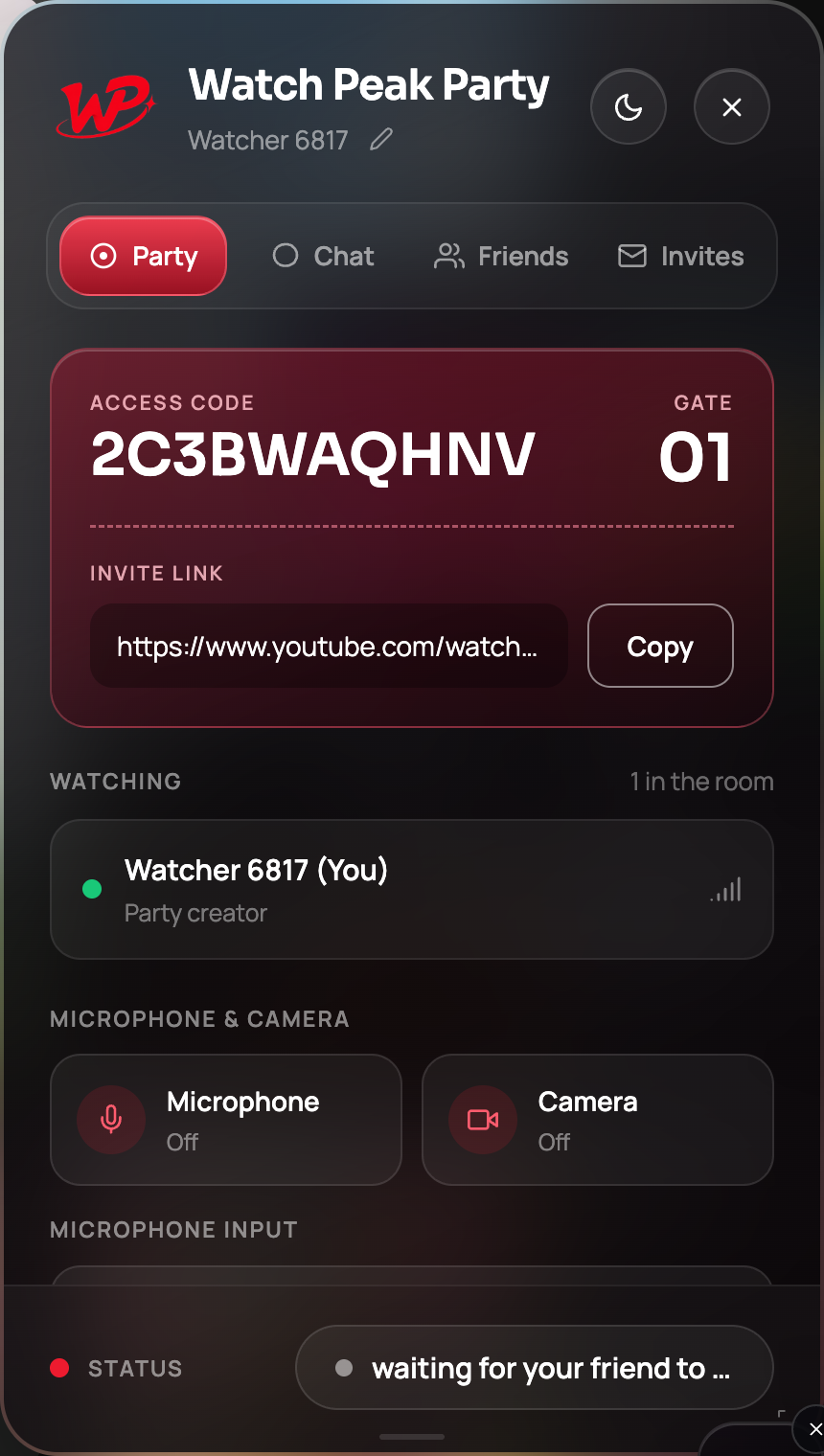
The button reports the real state. If it says Off while you are holding the key, the binding is the problem. -
Grant the microphone permission on this site
Chrome asks per site. If the party is on
netflix.com, the permission is fornetflix.com, and dismissing the prompt once is remembered as "no". Click the icon at the left of the address bar and allow the microphone there, then press the button again. -
Pick the right input device
Turn the microphone on once, and the device picker on the Party tab populates — Chrome does not reveal device names until permission has been granted at least once, which is why the list looks empty beforehand. If you have a headset, pick it explicitly rather than trusting "Default".
-
Check nothing else has the device
A conferencing app that holds an exclusive lock on a headset will win. Quit it, then re-press the Microphone button.
It works when they hear you and the Microphone status shows on for exactly as long as you intend it to — the whole time for an open mic, only while held for push-to-talk.
You cannot hear them
Run the previous section on their side first — it is far more often a sending problem than a receiving one. If their button says on and you still hear nothing:
- Check your own output. The film is playing, so something works; but if the film is on a different device from the one you expect voice on, you will hear one and not the other.
- Read the status pill. Voice runs over the same room connection as everything else. If the pill is amber, the room is the problem, not the microphone.
- Rejoin. Leaving and re-opening the invite link rebuilds the media connection from scratch. This fixes a surprising proportion of one-way audio.
One-way audio in particular — you hear them, they do not hear you, or the reverse — is nearly always a permission or device problem on the silent side, not a network problem in the middle.
Voice worked and then stopped
Then read the small line under the media buttons. Voice and video are the metered part of the product: there is a weekly allowance of free voice and video minutes, and when it runs out the panel says so in those words and offers Premium, which removes the limit.
Everything else keeps working. The party stays in sync, the chat stays unlimited and free, and the film is unaffected — you have lost voice, not the evening. If you watch long films regularly, push-to-talk is also genuinely cheaper: the microphone is only open while you hold the key.
Common questions
Does the extension change the film’s audio?
No. Each side plays its own stream through its own player. The extension never routes, mixes or re-encodes what you are watching.
Why is my microphone device list empty?
Chrome does not reveal device names until microphone permission has been granted once. Turn the microphone on, then the list populates.
Why did voice chat stop mid-film?
Most likely the weekly free voice and video allowance ran out. The panel says so under the media buttons. Sync and text chat are unaffected.
Push-to-talk does nothing — why?
Check it is switched on in the toolbar popup, and that a party is actually live. Outside a party the key does nothing by design.
We can hear each other but the film is silent for one of us
That is a player or system audio problem on that side, not a party problem. Check the tab is not muted in Chrome.
One link. Same second. No screen sharing.
Watch Peak Party keeps YouTube, Netflix, Prime Video, Crunchyroll, Disney+, Hulu, HBO Max and JioHotstar in sync — with chat, voice and video built in.
Add to Chrome