Short answer Check the service list, the permission list, whether both sides need it, and whether voice is included.
Every roundup of watch-party tools is written by somebody with a preference, including this one. So rather than a table of ticks you cannot verify, here are the seven questions that actually determine whether a tool works for your situation — and, for each, exactly where to look for the answer, on any product's own listing.
1. Does it support the service you actually use?
This is the question that eliminates most options, and the answer is always in the same place: the
extension's Site access list on its chrome://extensions details page, or the
"sites" section of its Web Store listing. Not the marketing copy — the permission list, which is what the browser
enforces.
Be specific about the service, too. "Supports Disney+" can mean the US catalogue only in practice, and a tool that lists a service it has not tested in your region is a tool that will fail on your film night rather than in its documentation.
For the record, ours declares exactly eight: YouTube, Netflix, Prime Video, Crunchyroll, Disney+, Hulu, HBO Max and JioHotstar. If you need one that is not on that list, we are the wrong answer, and a comparison table that says otherwise about anybody is worth distrusting.
2. What can it read?
Same page, and this time read it properly. An extension set to On all sites can read every page you open, including your bank — whatever the listing says it does. A named list of streaming domains cannot.
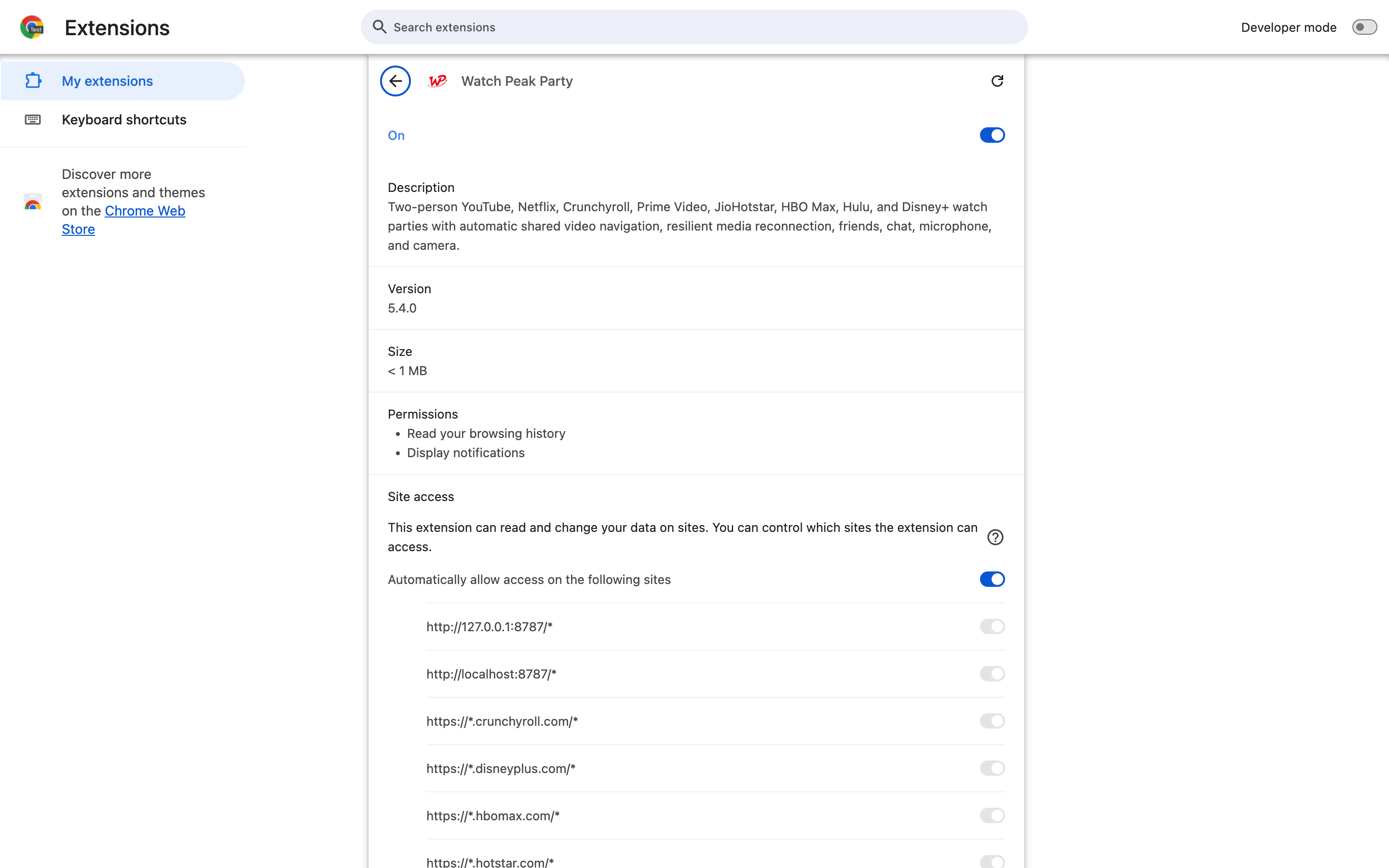
Then check the permissions against the features. A video-sync tool has no plausible use for
cookies, webRequest or debugger. There is a longer walkthrough in
the permissions guide, and the method works on any
extension, not just this category.
3. Does the other person need to install it too?
Usually yes, for a reason that is structural rather than lazy: keeping a player in step requires access to that player, and the browser will not grant a web page access to another site's video. Anything claiming one-sided synchronised playback is either re-broadcasting the video — a different and more legally interesting act — or overstating what it does.
What varies is how heavy the other person's step is. Worth checking:
- Do they need an account? Ours: no. A party by link works signed out on both sides.
- Do they need to type a code? Ours: no — the invite link carries the room and the video.
- Do they need the same plan or tier? Watch for tools that meter the joining side.
4. Is voice included, or is it text only?
Many watch-party tools are text-chat only, which is a legitimate design — text is the right register for a first watch. But if you wanted to hear the other person, a text-only tool means running a call alongside it, which brings back the notification sounds and the open microphone you were trying to escape.
If voice is offered, ask two follow-ups:
- Is there push-to-talk? An open microphone during a two-hour film means two hours of somebody's keyboard. Push-to-talk is the difference between voice being usable and voice being switched off after ten minutes.
- What is metered? Ours is explicit: parties, invites, friends and text chat are unlimited and free; voice and video minutes have a weekly free allowance, and Premium removes the limit. Look for that sentence on any product, and be suspicious when nobody will say which part costs money.
5. Does it shrink the video?
Look at the product's own screenshots. If the chat is a sidebar, the player is narrower than it would otherwise be — on a 1440-pixel window a 320-pixel sidebar costs you over a fifth of the picture area once letterboxing is accounted for.
A floating overlay avoids that but has to be movable and dismissible to be tolerable. The full argument is in the panel-versus-sidebar piece; the short version for a buying decision is: check whether the interface can be got out of the way in one gesture.
6. Is it maintained?
This matters more in this category than almost any other, because watch-party extensions break for reasons outside their control: a streaming service ships a player change and the tool stops working until somebody fixes it. A tool that is not actively maintained is a tool that will be broken within a year.
| Signal | Where to look |
|---|---|
| Recent version, with dated notes | The Web Store listing’s update date, and the developer’s own changelog |
| A real support address | The listing. Click it and see whether anything is there |
| A site that explains the product | Not a one-page template with stock photography |
| Recent reviews mentioning fixes | Not the star rating — the content of the last few reviews |
| Dated testing claims | A guide that says which browser and version it was tested on, and when |
An ownership change is the specific thing to watch for. Extensions get bought, and the update ships silently to everyone who has it installed.
7. Then test it before the film night
Five minutes, on the actual service, with the actual other person. In order:
- Both install it and reload the tab — a tab that predates the extension does not contain it.
- Start a party and send the link. Note how many steps their side took.
- Pause. Does it pause for them within a second?
- Scrub somewhere. Does it follow, or does one player error?
- Change the video. Does the party survive it, or do you have to start again?
- Turn on voice for a minute, if you plan to use it.
Test the video change. It is the case that separates tools that work from tools that demo well, and it is the thing your evening will actually do.
Common questions
Do all watch party extensions need to be installed by both people?
Effectively yes. Synchronising a player requires access to that player, and a web page cannot get that for another site. Anything claiming otherwise is doing something different.
What is the single most useful thing to check?
The Site access list on the extension’s details page. Where a tool may run tells you more than any feature list.
Is a text-only watch party tool worse?
Not necessarily — text is the right register for a first watch. It just means running a call separately if you also want to hear each other.
Why do watch party extensions stop working?
Streaming services change their players. That is why active maintenance and dated testing claims matter so much in this category.
One link. Same second. No screen sharing.
Watch Peak Party keeps YouTube, Netflix, Prime Video, Crunchyroll, Disney+, Hulu, HBO Max and JioHotstar in sync — with chat, voice and video built in.
Add to Chrome